I made over 30 QR codes, and I have regretted this decision ever since
In May 2026, I was helping Virsis Art prepare labels for the paintings in an art exhibition. For better storytelling (and to make it easy to contact the artist directly), we decided to put a QR code on each label, linking through to the artwork's page.
After some deliberation on how to generate the codes, I landed on Adobe Express : free, no meaningful limit on how many codes you can create, and it offers both scan statistics and the ability to change the destination URL after the code is already printed. Since I wanted scan statistics, I went with Adobe Express's dynamic, trackable QR codes.
I wish I hadn't.
Generating the codes itself was smooth, no complaints there. It also only collected scan-related information, meaning no unnecessary data collection. And yet, a few problems showed up.
During the opening of the exhibition (when it was already too late to reprint the labels), I noticed two issues:
- Latency. Because every scan was redirected through Adobe's servers to capture the statistics, the landing page took noticeably longer to load than it would have as a standalone link. That was compounded by the exhibition venue having weaker internet than expected, which was already slowing page loads down on its own.
- Losing people's trust. Most visitors just walked through the exhibition without engaging with the labels at all, but the ones who stopped to scan a code showed real hesitation. Most phone cameras preview the destination URL before you tap through to it. In this case, that preview was always an Adobe domain. The Virsis Art domain never appeared at all before the redirect.
If you're already familiar with how QR codes work, feel free to skip ahead to "Lessons learned." If not, this next part is for you.
QR codes
QR codes have been around for decades - since 1994, to be precise, invented by Masahiro Hara for tracking vehicle parts - but they only became genuinely popular much later. In the Western world, that popularity exploded during Covid-19, when contactless menus and check-ins became the norm.
There are two common QR code types: static and dynamic.
Static QR codes
A static QR code is generated from a single, fixed URL. It never expires, unless the code becomes physically unreadable or the destination URL itself stops working. On its own, a static QR code doesn't support any analytics.
If you want analytics from a static QR code, that capability has to live on the landing page itself. In marketing campaigns, this usually means adding campaign parameters (like UTM tags) to the destination URL, so the analytics platform on the receiving end can attribute traffic back to the code.
Regardless of how it's generated, a static QR code always contains the intended destination directly (no redirect involved).
Dynamic QR codes
Depending on the platform used to create them, dynamic QR codes can:
- Collect statistics on scans - views, date and time, device type, and location (typically IP-based),
- Let you change the destination URL without changing the printed code itself.
Some providers only offer one of these two features, some offer both, and some put one or the other behind a paywall. Dynamic QR codes tend to be the better fit for marketing campaigns, or for any situation where the destination might change after the code is already printed.
That flexibility relies entirely on redirects. If you're using a third-party service to generate the codes, scans are typically routed through that provider's own servers first, to capture the statistics, before being redirected to the real landing page (unless it's specifically configured otherwise).
Lessons learned - no more dynamic QR
The exhibition where these codes were trialed ran all summer, June through September 2026, and the 32 codes collected 249 scans in total. Given the mistrust and the latency, and given that the venue's primary purpose wasn't the exhibition itself - the paintings were more of an addition to the interior than the main draw - that's a decent scan count.
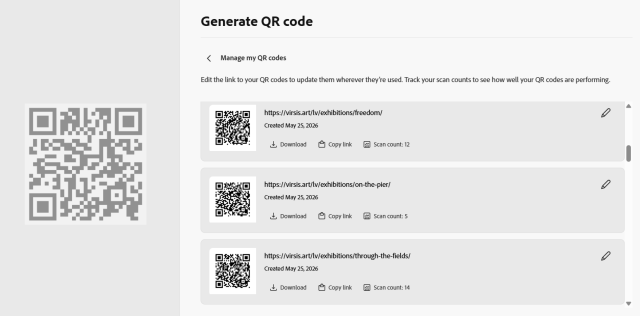 Adobe Express interface for dynamic code creation and management
But the main lesson for the next upcoming exhibition, where I am again in charge of the label creation - I am not using dynamic QR codes. It is static, from start to finish.
What about statistics?
This is exactly where the alternative I prefer comes back in - URL parameters like utm_source, paired with a proper analytics platform on the landing page. Which platform, you might ask - for the next two months, it's Plausible, largely because of its privacy-friendly approach. Since it doesn't use cookies or session storage and doesn't collect personal data, no cookie banner is required, which means essentially all of the session statistics from QR code traffic can be captured - unless the script that powers Plausible tracking gets blocked by a privacy-focused browser or extension, the kind designed to stop any tracking activity, regardless of whether it actually breaches ePrivacy or GDPR.
The takeaway
Neither static nor dynamic QR codes are the wrong choice. Rather the application and need for the type of QR code need to be considered. Even for marketing campaigns where statistics matter for audience and performance optimisation, it doesn't have to rely on QR code generator statistics for scans unless there is a worry of traffic not engaging with the landing page past cookie banner. The statistics aquired is not worth increased latency or doubt in the mind of someone right before decision of navigation to landing page.
So before your next QR code goes to print ask the question: Do you need to know exactly how many people scanned it, or will campaign parameters and a proper analytics setup on the landing page tell you everything you need? If it's the second one, a static code is the better choice. Every single time.